Storeganise automations
Introduction to automations
Storeganise provides a wide range of automation tools designed to reduce manual tasks, improve efficiency, and deliver a seamless experience for your customers. These automations help your facility run smoothly even outside of staffed hours ensuring faster order processing, accurate billing, and proactive communication.Billing automations
Storeganise supports automated recurring billing for existing tenants, reducing manual invoice handling and improving payment collection timelines.- Automated recurring invoicing
- Automated invoice charging
- Overdue invoice handling
- Mark invoices as overdue
- Trigger overdue reminder notifications
Move-in automations
Storeganise can automate key actions during the move-in process to streamline operations and deliver a smooth customer experience.- Move-in order processing
- Auto confirm order: when enabled, new orders will be automatically confirmed and invoices will be created.
- Auto charge invoice: when enabled, the customer's invoice will be automatically charged upon entering payment information.
- Autocomplete order: when enabled, the order will be completed and closed.
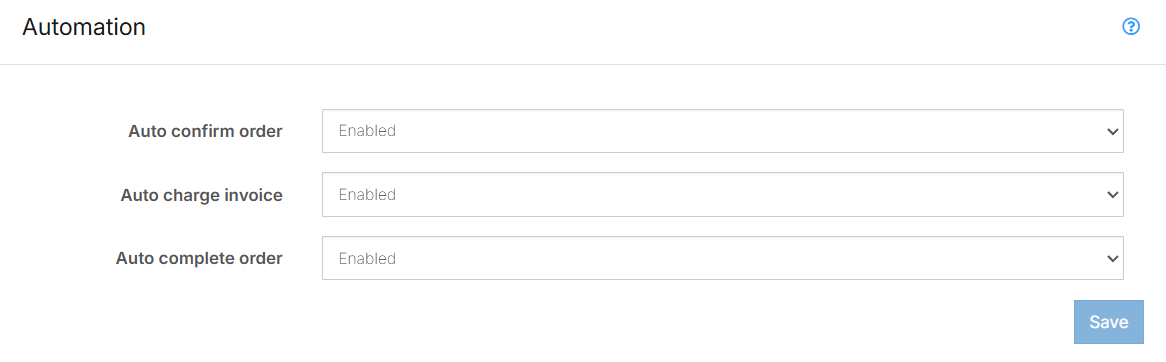
- Move-in communication triggers
- Reservation or move-in confirmation
- Welcome instructions
- Facility and unit access details
- Access activation (when integrated)
- Digital keys / codes assigned
- Access permissions granted immediately
Move-out automations
Storeganise can automate key actions during the move-out process to streamline operations, ensure accurate billing, and prevent access issues once a customer leaves.Storeganise can automatically:- Initiate move-out jobs on the scheduled date
- Create a credit note refund invoice when applicable
- Revoke facility access once move-out is confirmed
Communication automations
Storeganise can automatically send customer and admin communications based on key account and billing events, helping reduce manual follow-up and ensuring both parties stay informed.Common automated triggers include:- Reservation and move-in confirmations
- Invoice issuance
- Payment failure and overdue reminders
- Move-out scheduled or completed
- Internal admin emails
- Customer-specific fields and facility branding
- Optional SMS notifications using Twilio
Access control automations
When using an integrated access control provider, Storeganise syncs customer permissions based on rental and billing status.Automated updates include:- Granting access after move-in
- Restricting or locking access when overdue or suspended
- Restoring access once payments are up to date
- Syncing access codes using custom fields
Revenue automations
Storeganise automates key revenue processes like late fees, rent increases, and dynamic pricing, keeping your pricing and billing accurate without manual work.- Late Fees
- Apply late fees automatically once an invoice becomes overdue
- Set the amount based on absolute value or relative to total %
- Scheduling rent increases
- Schedule rent or price changes to take effect automatically on a set date
- Help you plan and manage rate adjustments in advance
- Dynamic pricing
- Set rules and thresholds for when prices should increase or decrease
- Apply pricing adjustments across multiple unit types or locations in real time
Workflow automations
Storeganise supports workflow automations that connect your data and actions across multiple platforms, helping you streamline processes, reduce manual tasks, and keep operations running smoothly.- Zapier
- CRM updates
- Accounting sync
- Reporting or admin tasks
Jump to