Add-on: Stripe
Getting Started
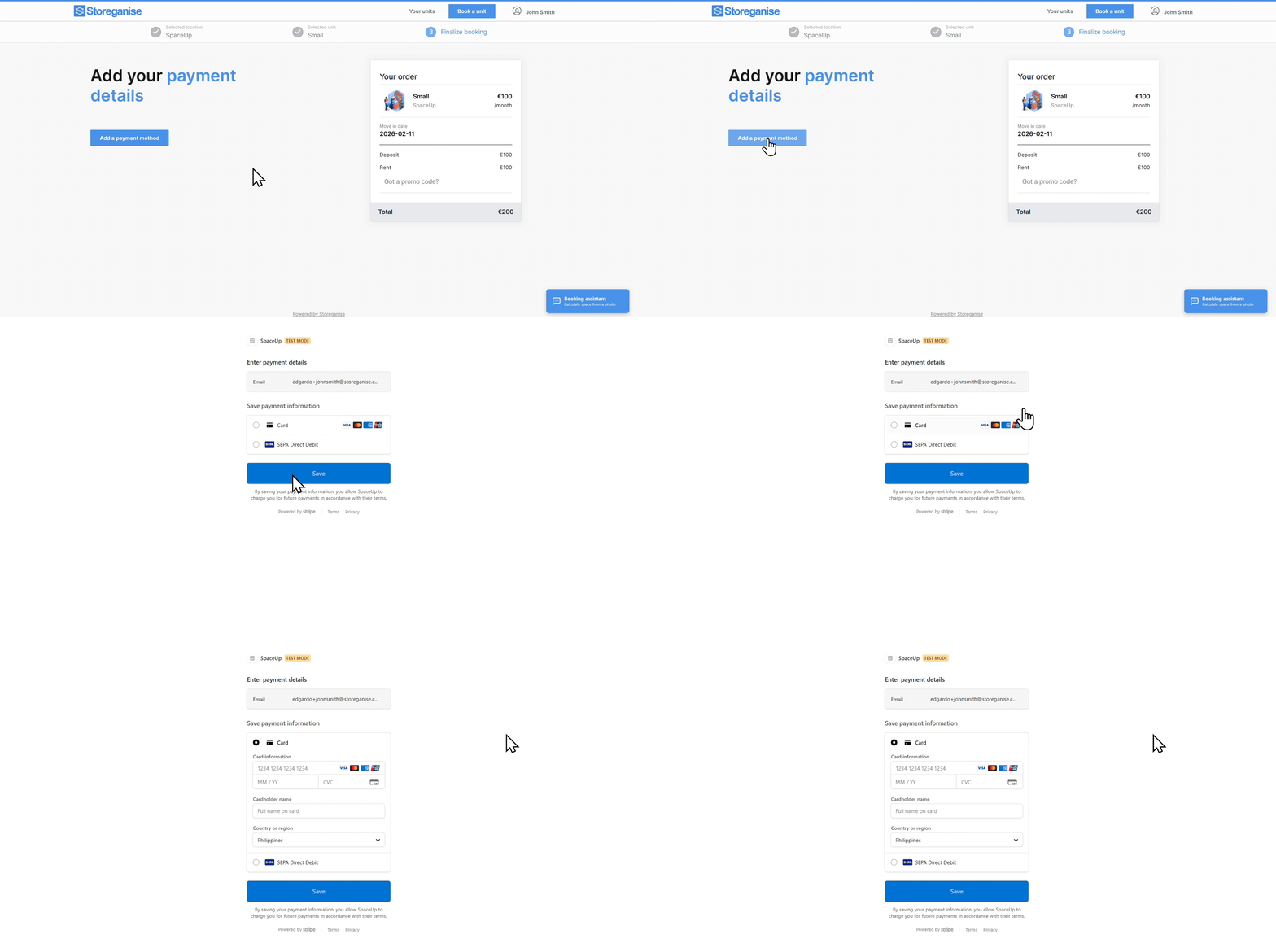
The below is an interactive demo
Setting up Stripe via the Management Portal
You don't need a Stripe account before you start. If you don't have one, don't sign up on the Stripe website first. Once the Add-on is installed, the connection link lets you create a new Stripe account or connect an existing one, so it's set up correctly with Storeganise.- Reach out to Storeganise Support to request the Add-on to be installed.
- Once installed, navigate to Main Settings > Add-ons.
- On the Add-ons page, select Stripe, then click Enable to activate the Add-on.
- Once enabled, a task will generate prompting you to connect your Stripe account.
- Click on the task, then click the link in the description to open the connection request tab.
- Follow the steps on the new page to connect your Stripe account.
Custom Booking Apps/Flow
If you are building a custom customer facing app or booking flow, you can use the custom billing API to handle payments. This allows you to redirect users to a hosted checkout page to register payment methods and list saved cards directly in your app.For technical details and implementation steps, you can check our dedicated help doc here: Accepting payments in a custom booking app.Entering Payments on a Customer's Behalf (MOTO)
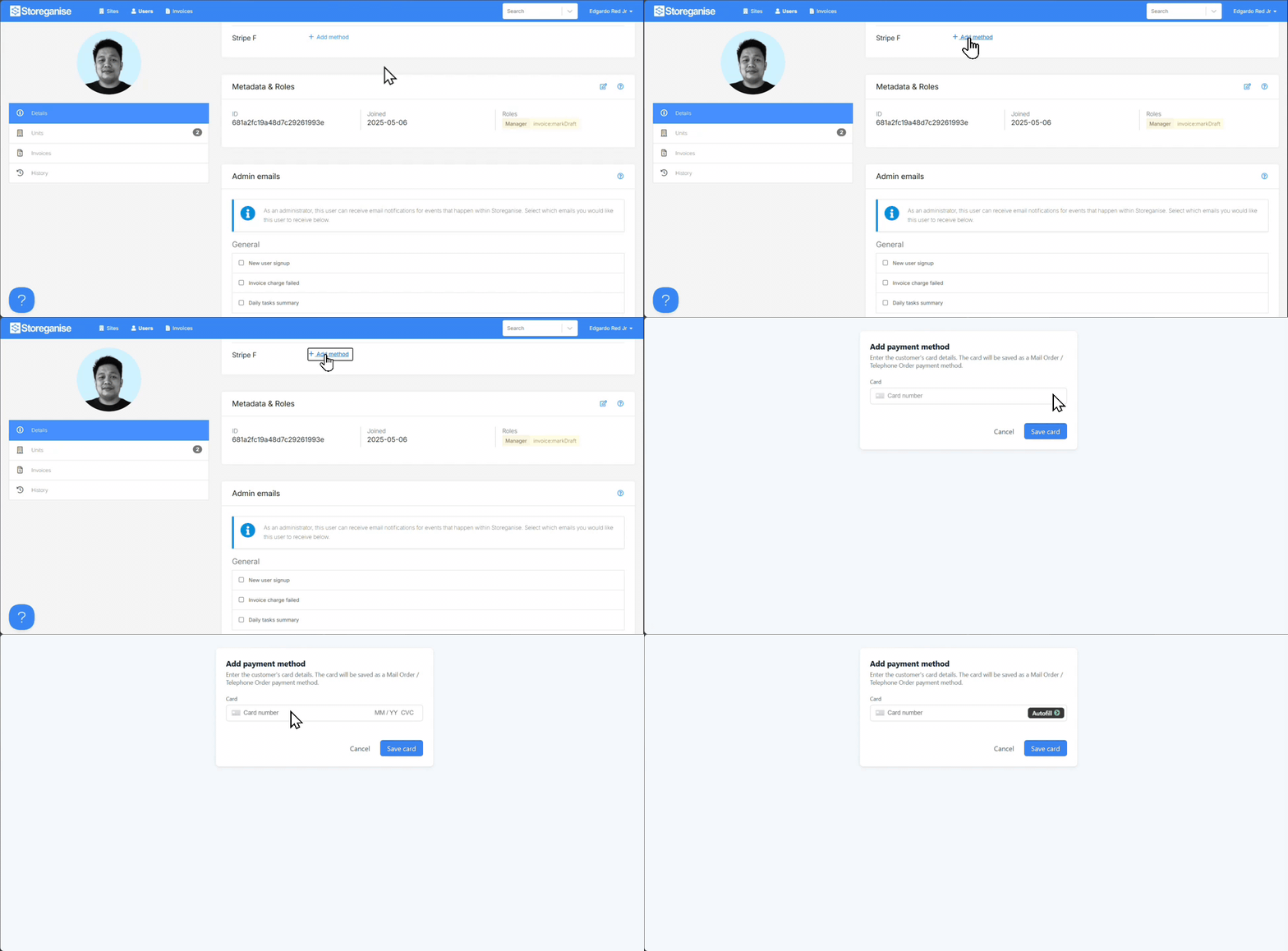
- Open the customer's profile in the Management portal.
- Select Add/Update Payment Method.
- Complete the secure, Stripe-hosted checkout process on behalf of the tenant, entering their card details as they read them out to you.
Note: This method currently only supports adding card details. If a customer wants to pay via SEPA, iDEAL, or another payment method, they'll need to add that themselves through the Customer portal.
FAQs
How can I test my Stripe connection is successful?
To test your Stripe connection, you can quickly run a test booking to confirm that the linking is successful. When the payment window opens, look at the top section — you should see your Stripe account name displayed under the label.

Does Storeganise have additional fees when processing payments through Stripe?
No. Storeganise does not charge any additional processing fees. The only fees you pay will be directly to Stripe.
Can I integrate multiple Stripe accounts (e.g. for separate locations)?
Yes. Since the Add-on can now be installed at the site level, you can have it installed on each site and use a different Stripe account for each one.
What types of payments are accepted by Stripe?
The payment types accepted by Stripe vary by region. Not all payment methods supported by Stripe will necessarily work with Storeganise. In general, credit cards, Apple Pay, Google Pay, and recurring payment methods such as direct debits are supported.
Does Stripe support direct debit payments?
Yes, Stripe supports direct debit payments in supported countries. Availability depends on your account’s country and currency settings. Please refer to Stripe’s documentation for full details.
How do I set up different payment methods?
View this help doc to set up payment methods other than cards.
Can one user have multiple payment methods on their account?
Yes. Customers can store multiple payment methods, such as different credit cards or bank accounts, on their account. You can select which method is used for future payments.
Why do some cards not work with 3DS, and what can we do to address this?
Some cards may not support 3D Secure (3DS) authentication, or the issuing bank may not require it for certain transactions. Enabling Radar rules in Stripe can help ensure additional verification checks where possible.
How can we set up card verification during checkout to increase security?
You can enable Radar, which includes a rule to block any payments that fail the verification check. You can enable or disable this within the Dashboard. For more information and further assistance, please contact Stripe support. (Stripe reference)
Are refunds processed automatically through Stripe?
Refunds are not automatically processed. You’ll need to initiate a refund manually when issuing a credit note. For instructions, follow our guide here.
How long does it take for funds to be deposited into my bank account?
Stripe’s payout schedule varies by country and account status. In most cases, payouts are made on a rolling 2–7 day basis. Weekends, public holidays, or pending account verification can delay payouts. You can view and manage your payout schedule directly in the Stripe Dashboard.
What are Stripe’s fees?
Stripe’s fees depend on the payment method, currency, and your location. Storeganise does not charge any additional processing fees. You can view the full fee structure on Stripe’s pricing page.
How do I disconnect my Stripe account to Storeganise?
If you no longer want to use Stripe or plan to switch to another Stripe account, reach out to support for further assistance.
Using a different Stripe account?
When transitioning to a new Stripe account, you’ll want to plan ahead for moving over the Stripe tokens from your current account. This ensures the new account you'll use can continue billing existing customers without any issues. For more information on how this process works, Stripe has a helpful guide
here.
Ready to get started?
Send us your request and the Storeganise team will install the Stripe Add-on for you.
Request installation